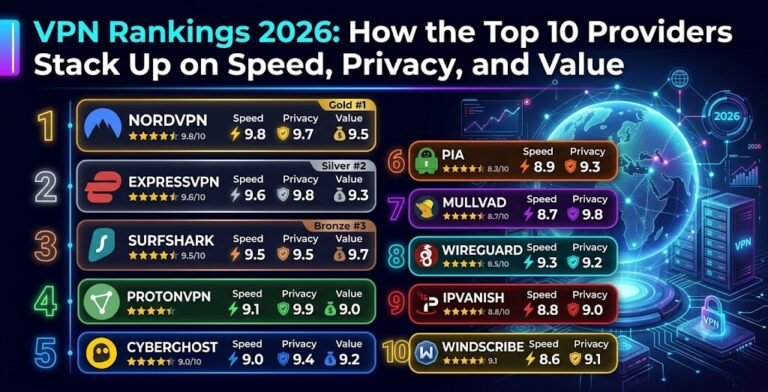
Gaming puts different demands on a VPN than everyday browsing or streaming. A few extra milliseconds of latency can be the difference between winning and losing a competitive match, and gamers face threats — DDoS attacks, swatting, and IP-based harassment — that most casual internet users never encounter. The Zylory Team evaluated the leading VPNs for gaming performance in 2026, focusing on added latency, jitter stability, DDoS mitigation, and console and router support.
Why Gamers Need a VPN in 2026
A quality gaming VPN serves three practical purposes. First, it masks your real IP address, which protects competitive players and streamers from targeted DDoS attacks and doxxing attempts — a real risk for anyone visible in gaming communities. Second, it can help route around ISP throttling; some internet providers slow connections during high-bandwidth activity like gaming or large downloads, and encrypting your traffic makes that kind of selective throttling much harder to apply. Third, it can occasionally improve routing: if your ISP sends traffic to a distant or congested path, a VPN server positioned closer to the game’s data center can sometimes reduce latency rather than add it.
It’s worth setting expectations correctly: a VPN typically adds somewhere in the range of 5–20 milliseconds of latency under normal conditions because of the encryption and extra routing hop. That is barely noticeable in most games. The exception is when your baseline connection is already inefficient, in which case a well-placed VPN server can sometimes lower your ping rather than raise it.
How We Evaluated Gaming Performance
Testing combined synthetic speed-test benchmarks with real in-game latency and jitter measurements across multiple regions and peak-traffic windows, since a VPN that looks fast on a speed test can still stutter once real game traffic and packet loss enter the picture.
1. NordVPN — Best Overall Gaming VPN
NordVPN was the most consistent performer across our testing, with latency increases in the low single digits to low double digits of milliseconds on nearby servers thanks to its NordLynx (WireGuard-based) protocol. Its built-in threat-blocking feature filters malicious traffic and DDoS attempts automatically, and the network’s scale — more than 9,000 servers across 111+ countries — makes it easy to find a low-latency option no matter where a game’s servers are hosted.
2. ExpressVPN — Best for Console and Router Setups
ExpressVPN’s Lightway protocol held up well under sustained load, including during large patch downloads, without meaningful speed degradation. Its native router applications make it one of the simplest ways to protect a PlayStation, Xbox, or Switch, since consoles cannot run VPN client software directly and need to be covered at the router or via a shared connection instead.
3. Surfshark — Best Value for Squads and Households
Because Surfshark allows unlimited simultaneous connections, it is the most economical way to cover an entire household’s worth of gaming devices, consoles, and phones on one subscription. Its WireGuard-based connections stayed stable in testing, with anti-DDoS protection enabled by default across its server network.
4. Proton VPN — Best for Port Forwarding and Server Choice
Proton VPN’s roughly 20,000-server network gives gamers an unusually wide choice of low-latency locations, and its support for port forwarding is a genuine advantage for players who host their own game servers or need direct peer-to-peer connections for certain titles.
5. Private Internet Access — Best for Unlimited Devices and DDoS Defense
PIA pairs unlimited device connections with a court-tested no-logs policy and an ad- and malware-blocking feature called MACE. Its interface is less polished than NordVPN’s or Surfshark’s, but its DDoS protection and consistent US server performance make it a solid budget-friendly pick for domestic gaming.
Comparison Table
| Provider | Best For | Protocol | DDoS Protection | Router / Console Support |
|---|---|---|---|---|
| NordVPN | Overall low latency | NordLynx (WireGuard) | Yes, automatic | Yes |
| ExpressVPN | Console & router setups | Lightway | Yes | Yes, native router apps |
| Surfshark | Unlimited devices / squads | WireGuard | Yes, default on all servers | Manual router setup |
| Proton VPN | Port forwarding & server choice | WireGuard | Yes | Yes |
| Private Internet Access | Budget & unlimited devices | WireGuard | Yes | Yes |
How to Choose a Gaming VPN
- Latency, not just speed: A high download-speed score doesn’t guarantee low ping. Look for providers that publish or allow you to check per-server latency before connecting.
- DDoS protection: Confirm the provider actively filters malicious traffic rather than simply hiding your IP as a side effect of the tunnel.
- Server proximity: A server that is geographically closer to the game’s data center will almost always outperform a “fast” server on the other side of the world.
- Router or console app support: Since consoles can’t install VPN software natively, router-level support (or a shared connection from a PC) is essential for PlayStation, Xbox, and Switch users.
Setting Up a VPN on PS5, Xbox, and Switch
Since consoles don’t support VPN apps directly, the two practical options are configuring the VPN at the router level (protecting every device on the network at once) or sharing a VPN connection from a Windows or Mac computer over Ethernet. Providers with dedicated router firmware or setup guides, such as ExpressVPN and NordVPN, tend to make this process considerably smoother than manually configuring a generic router.
Frequently Asked Questions
Will a VPN lower my ping? Usually not by default, but it can in specific cases where your ISP routes traffic inefficiently or where a VPN server offers a more direct path to the game server.
Is using a VPN for gaming against the rules? Using a VPN itself is not against the rules for most games. However, using it specifically to evade regional bans, manipulate matchmaking, or bypass a game’s terms of service can violate that game’s policies and, in some cases, lead to account restrictions — check the specific title’s terms before relying on a VPN for anything beyond privacy and security.
Do I need a VPN if I only play casually at home? If you’re not experiencing throttling, DDoS risk, or regional restrictions, a VPN is a nice-to-have rather than a necessity. Competitive players, streamers, and anyone who has experienced targeted attacks benefit the most.
About the Author